

Direct Answer: A PS4 stuck on a firmware update loop is usually caused by an update that was interrupted mid-install, and a Safe Mode reinstall from USB fixes most cases without touching your saves. If the loop keeps happening after a clean Safe Mode update, the hard drive or power supply is the real fault — that’s board-level and drive repair work Saved Game handles UK-wide by mail-in, or locally near Hessle.
Key Takeaways
- Try Safe Mode Option 3 (update system software from USB) first — it doesn’t erase saves or games.
- If a fresh, correctly formatted USB update still loops or fails, the hard drive is the most likely cause, not the firmware file.
- Never jump straight to “Initialize PS4” — that’s a full factory reset and your last resort, not your first troubleshooting step.
PS4 Stuck on Firmware Update Loop Near Hessle
Your PS4 boots to the blue screen, tells you it needs a system update, restarts the install, and then does it all again — sometimes with an error code like CE-30002-5 or CE-36329-3 flashed up first. It’s one of the more common faults we see, and it can mean anything from a five-minute fix to a hard drive that needs replacing. Hessle is about 15 miles from our Market Weighton bench, and we take PS4 repairs both as local drop-offs and mail-in from anywhere in the UK.
What actually causes the loop
Most firmware loops start the same way: the console was powered off, lost power, or had its update interrupted partway through, leaving the system software in a half-installed state. On next boot, the PS4 detects the incomplete update and tries again — and if whatever interrupted it the first time (a flaky USB stick, a corrupted download, a failing drive) is still a problem, it loops indefinitely instead of completing.
The less common but more serious cause is the hard drive itself failing to write new data reliably. Firmware updates rewrite system files across the drive, so a drive with bad sectors or early mechanical failure can fail an update every single time, no matter how many times you retry it or how fresh the update file is. A struggling power supply that can’t sustain the console through the several-minute install process is the other real culprit worth ruling out.
Fix attempts, and when each one actually works
| Fix Attempt | What It Does | Works When | Doesn’t Fix |
|---|---|---|---|
| Safe Mode Option 3 — Update System Software (USB) | Reinstalls firmware fresh from a USB stick with PS4UPDATE.PUP in /PS4/UPDATE/ | Interrupted or corrupted update, most common cause | Failing hard drive, dying power supply |
| Safe Mode Option 5 — Rebuild Database | Rescans the drive and rebuilds the content list without erasing saves | Corrupted content index after a crash | Loop that happens before the drive is even readable |
| Different USB stick / re-downloaded update file | Rules out a bad download or faulty USB drive | The original update file or stick was the problem | Hardware faults on the console itself |
| Hard drive replacement | Removes the component that’s actually failing to write the update | Loop persists after a clean Safe Mode update with a known-good USB | N/A — this is usually the actual fix at this point |
Trying it yourself first
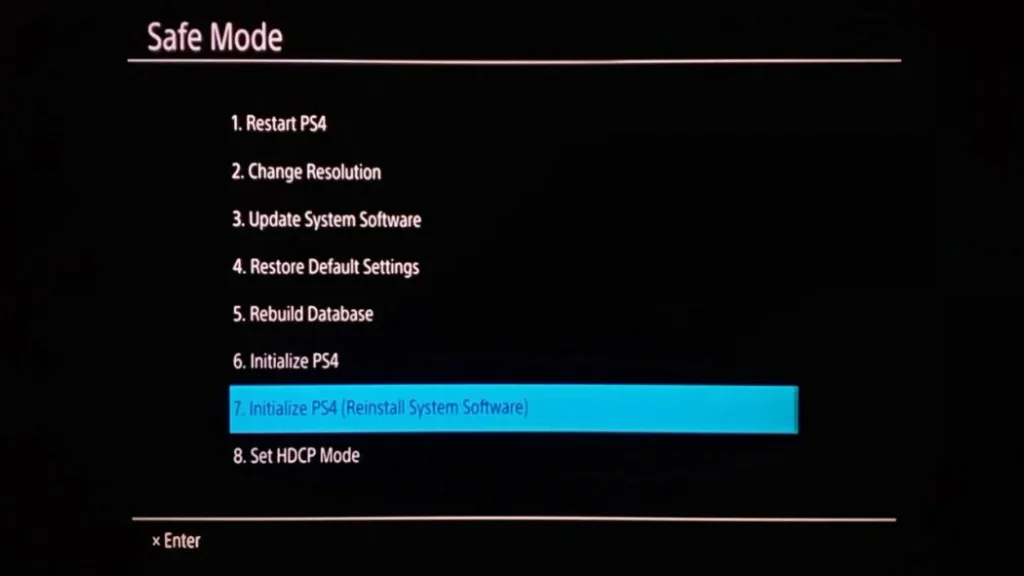
It’s worth attempting Safe Mode before booking a repair, since it costs nothing but a few minutes. Hold the power button until you hear two beeps to enter Safe Mode, then choose Option 3: Update System Software, using a USB drive formatted FAT32 or exFAT with the latest official update file saved as PS4UPDATE.PUP inside a folder named PS4/UPDATE in the root of the drive. This reinstalls the firmware cleanly without touching your saves or installed games.
If that completes successfully, you’re done. If it fails again, or fails with the same error code, that’s the signal the problem isn’t the update file — it’s the hardware trying to write it. That’s when it’s worth getting it looked at rather than repeatedly re-downloading the same update and hoping.
What we check when a looping PS4 comes in
We start with a free diagnostic to isolate whether it’s the hard drive, the power supply, or a deeper NAND/system partition corruption on the motherboard itself. Hard drive replacement is usually the fix and usually straightforward — we can fit a larger drive at the same time if you’d like more storage out of the repair. Power supply faults get a proper replacement, not a temporary patch. In the rarer case of board-level corruption, that’s the same capacitor-level and connection diagnostics we do on every console that comes through the door.
[PHOTO: PS4 opened up with the hard drive bay exposed during diagnosis — alt: “PS4 firmware update loop repair, hard drive replacement, Saved Game Market Weighton”]
Getting your PS4 to us from Hessle
Hessle is about 15 miles from our Market Weighton bench, roughly a 20–25 minute drive, so a local drop-off is easy if you’d rather hand it over than post it. Most customers use our mail-in service instead: fill out the form, tell us the error code and what you’ve already tried, and we’ll send shipping instructions. You’ll get a free assessment and a fixed quote before we start any work — we never just crack on and bill you afterwards.
Frequently Asked Questions
What does it mean when a PS4 is stuck in a firmware update loop?
It means the console keeps trying to install the same system software update and failing, usually restarting the install rather than completing it. The most common cause is an update that was interrupted partway through, but a repeating loop that survives a Safe Mode reinstall is often a sign the hard drive is failing to write the new files.
Will I lose my saves if my PS4 is stuck updating?
A Safe Mode update reinstall (Option 3) does not erase your data. Rebuilding the database (Option 5) also keeps your saves and games, just rescans them. Only “Initialize PS4” (Option 6/7, full factory reset) wipes everything, and that should be a last resort, not a first attempt.
Why does my PS4 fail to update even with a fresh USB file?
If a correctly formatted USB stick with the latest PS4UPDATE.PUP file in a /PS4/UPDATE/ folder still fails or loops, the hard drive is the usual suspect — it’s failing to write the new firmware to disk. A struggling power supply that can’t sustain the console through the install is the other common cause.
Can Saved Game fix a PS4 stuck on firmware update near Hessle?
Yes. We diagnose whether it’s the hard drive, power supply, or a corrupted NAND/system partition, then repair or replace the failed component and get the console back on the correct firmware. Hessle is about 15 miles from our Market Weighton bench, and we also take mail-in repairs from anywhere in the UK.
Still looping after Safe Mode? Open a support ticket, check repair prices for other faults, or start a mail-in repair today — Hessle to Market Weighton is about 20 minutes if you’d rather drop it in yourself.
- PS5 Won’t Read Discs, Won’t Eject or Grinds: Model-Specific Fixes
- ModRetro M64: What It Is, What It Does, and Who It’s For
- Will Steam Deck Get GTA 6? Everything Steam Deck Owners Need to Know (2026)
- PS5 Fan Connector Repair | Ripped Off by USer
- Is Your Console Actually Dead? The 10-Minute Check Before You Bin It

Leave a Reply